Don't Buy the Asus Zenbook S 16 Until You Read This Full Analysis
Laptops Category Analysis
Laptops have become indispensable tools for professionals, students, and creators alike. As new models continue to arrive, buyers face ever more nuanced choices — especially in the premium thin-and-light space. In this article, the Asus Zenbook S 16 comes under the microscope, with a detailed analysis aimed at equipping you with everything you need to make an informed decision. Before committing to the Zenbook S 16, it's worth examining exactly what it offers, where it excels, and where it falls short, especially compared to the competition.
Introducing the Asus Zenbook S 16
The Asus Zenbook S 16 is marketed as an ultra-thin flagship laptop, merging cutting-edge hardware with a minimalist design. In the crowded premium laptop category, it promises portability, performance, and a premium build. What sets it apart is Asus’s claim of exceptional thinness and lightness, advanced AI capabilities via AMD’s latest processors, and a sustainability focus in materials and construction — all within the 16-inch notebook segment.
Who Is the Zenbook S 16 For?
This laptop is aimed at users who value mobility as much as power. It should appeal to traveling professionals, students seeking a balance of size and portability, and content creators in need of a strong display and capable hardware. With increasing interest in AI workflows and enhanced video calls, the S 16 also targets early adopters of next-gen productivity features.
Asus Zenbook S 16: Detailed Review and Analysis
Build Quality and Design
The Zenbook S 16 makes a dramatic first impression with its ultra-svelte profile, measuring only around 1.1 cm thick and weighing just 1.5 kg (specifications may vary by configuration). Using a magnesium-aluminum alloy chassis, Asus tries to ensure rigidity while reducing weight. The signature, minimalist Zenbook aesthetic is evident — clean lines, subtle branding, and a “ceramic” finish.
However, the pursuit of thinness introduces some real-world consequences. The palm rest and lid show slight flex under moderate pressure, which, while not uncommon in ultra-light notebooks, may affect longevity under frequent travel or heavy handling. The blend of recycled materials is environmentally responsible, but doesn’t always convey the same feeling of cold, solid metal as some competitors (such as MacBook Pro or the Dell XPS 16).
Display Quality
The 16-inch OLED display is a standout, offering 3.2K resolution (3200 x 2000 pixels), a fast refresh rate (up to 120Hz), impressive color accuracy (100% DCI-P3), and deep blacks thanks to OLED technology. For creators working with photography or video, this is a significant plus; the panel’s brightness and HDR support make multimedia consumption a pleasure.
That said, OLEDs are more reflective than matte IPS alternatives, and they can be more susceptible to screen burn-in with static elements (e.g., interface bars). Users focusing on spreadsheet work or lots of text-based tasks in bright offices may notice more glare.
Performance: AMD Ryzen AI Inside
Central to the S 16’s appeal is the inclusion of AMD's Ryzen AI 300 series processor (such as the Ryzen 9 AI HX 370), paired with up to 32GB LPDDR5X RAM and up to 2TB SSD storage. This chip includes a dedicated NPU (Neural Processing Unit) to accelerate on-device AI features, notably enhancing camera effects, noise reduction, and more in compatible applications.
In real-world office productivity tasks (web browsing, document editing, multitasking with Teams/Slack/Zoom), the S 16 remains silent and cool, easily handling dozens of browser tabs with aplomb. The integrated Radeon 890M GPU, while not a dedicated gaming card, supports moderate creative work (photo editing, lightweight video editing) and can run older or moderately demanding games at reasonable settings.
The AI acceleration offers some forward-looking value in apps that support it (notably Windows Studio Effects for video calls or experimental features in Microsoft’s Copilot+ suite), but most mainstream creative and office workflows still lean on CPU and GPU.
Find top-rated Laptops & Computers products at great prices.
Shop Amazon →Battery Life and Charging
Despite its slim dimensions, the S 16 is managed by a 78Wh battery. Under a balanced workload — office work, light streaming, and occasional video calls — users can expect between 8 to 11 hours of real-world use. Enabling the OLED’s 120Hz refresh rate taxes battery further, especially during creative or high-brightness workloads.
USB-C fast charging is present, supporting up to 65W. A brief 30-minute top-up yields several hours of additional work time, but heavy users might still find themselves reaching for the charger mid-day, particularly if their workload involves continuous video editing or streaming.
Ports and Connectivity
Port selection on the Zenbook S 16 strikes a compromise typical of ultra-slim designs:
- 2 x USB 4.0 Type-C (with Power Delivery and DisplayPort)
- 1 x USB 3.2 Gen 1 Type-A
- 1 x HDMI 2.1 (full size)
- 1 x headphone jack
- 1 x microSD card reader
Most users will find this adequate for basic needs — external displays, USB peripherals, and charging. However, creative professionals wanting to import content from full-sized SD cards, or connect multiple devices, may still need to rely on dongles or hubs.
Keyboard, Trackpad, and User Input
The keyboard features a comfortable layout with decent travel for such a thin device, and backlighting is uniform. The keys, however, are a bit shallow compared to thicker laptops, and aggressive typists may desire a more tactile response. The ultra-large trackpad is precise and supports Windows gestures well. There’s also an integrated fingerprint sensor for quick logins, and the presence of an IR camera means Windows Hello face unlock is available.
Speakers and Multimedia
The quad-speaker system is above average for an ultraportable, delivering clear dialog and reasonable bass. For casual streaming and video conferences, quality is good, but it won’t replace dedicated external speakers for music fans or creators working with audio.
Thermals, Noise, and Maintenance
Thermal performance is generally good, owing to an advanced vapor chamber system. Under heavy loads, the bottom may get warm, but fan noise remains modest, rarely rising above a gentle hum. Asus’s software allows users to tune fan profiles for silent operation or full performance. Upgradability is limited — RAM is soldered, but the SSD is user-upgradable.
Software Experience
The S 16 ships with Windows 11, including some Asus utilities for hardware control and updates. As with many Windows laptops, there’s some pre-installed software, though Asus has done better lately at reducing unnecessary bloat. AI-powered features, while promising, are somewhat dependent on OS and app support, which is still in its infancy for most workflows in mid-2026.
Pros and Cons
- Pros
- Ultra-thin and lightweight; among the most portable 16-inch laptops available
- Superb OLED display with high resolution and color accuracy
- Strong productivity performance with AMD Ryzen AI processor
- Good battery life relative to size and screen class
- Forward-looking AI hardware features
- Quiet operation even under load
- Respectable port selection for a slim device
- Eco-friendly materials and packaging
- Cons
- Some chassis flex, especially in the lid and keyboard area
- OLED display, while gorgeous, is reflective and may suffer from burn-in long-term
- RAM is soldered – no possibility for future upgrades
- MicroSD reader instead of full-size SD card slot
- Keyboard travel is shallow; may not suit all typists
- AI features still niche outside select applications
- Premium price – cost is in the same range as more powerful, heavier laptops
Asus Zenbook S 16 vs Key Competitors
| Model | CPU/GPU | Display | RAM/Storage | Weight | Battery (rated) | Unique Features |
|---|---|---|---|---|---|---|
| Asus Zenbook S 16 | AMD Ryzen AI 300 series / Radeon 890M | 16" 3.2K OLED, 120Hz | 32GB LPDDR5X, 2TB SSD (max) | ~1.5 kg | 78Wh (~8–11hrs typical) | AI NPU, ultra-thin, eco materials |
| Dell XPS 16 (2024) | Intel Core Ultra 9 / RTX 4060 | 16.3" OLED/IPS, 120Hz | 64GB DDR5, 4TB SSD (max) | ~2.1 kg | 99.5Wh (~9–13hrs typical) | Large touchpad, premium build |
| Apple MacBook Pro 16-inch (M3) | Apple M3 Pro / M3 Max | 16.2" Liquid Retina XDR (mini-LED) | 128GB unified, 8TB SSD (max) | 2.14 kg | 100Wh (~11–15hrs typical) | Best-in-class battery, top-tier build |
| Lenovo Slim Pro 9i 16" | Intel Core Ultra 7/9 + RTX 4050 | 16" 3.2K IPS/OLED, 165Hz | 64GB DDR5, 2TB SSD (max) | ~1.9 kg | 75Wh (~7–9hrs typical) | Fast screen, strong creative performance |
Buying Guide: What Should You Consider?
1. Portability vs. Power
If you’re constantly on the move, the S 16’s ultra-light build is a real asset. However, mobile workstations like the Dell XPS 16 or MacBook Pro sacrifice some portability for greater raw power, audio, and longevity.
Find top-rated Laptops & Computers products at great prices.
Browse Now →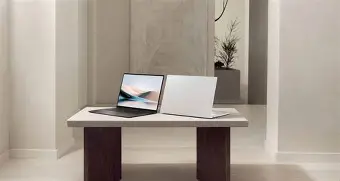
2. Display Needs
OLED screens are superb for creators seeking deep contrast and vivid colors, but they are more reflective and can be susceptible to burn-in with static images. If your workflows are text or spreadsheet-heavy, you may prefer a matte IPS or mini-LED alternative.
3. AI Capabilities
The integrated NPU in the Zenbook S 16 provides accelerated on-device AI experiences in select apps. Early adopters who want the latest neural features should benefit, but if your workflow doesn’t use these, they may be less relevant in 2026.
4. Keyboard and Input
Keyboard comfort is subjective. The S 16’s shallow key travel may not satisfy users who type for many hours daily — trying out the device in-store is recommended if you’re particular about typing feel.
5. Upgradeability
RAM is soldered, which could be limiting in future years as workloads grow. Opting for the 32GB configuration off the bat is wise for power users. SSD is upgradable, so storage expansion is possible.
6. Battery Demands
While respectable, battery life is still impacted by heavy workloads and OLED brightness. If marathon unplugged sessions are vital, the MacBook Pro line remains the gold standard.
7. Pricing and Value
The Zenbook S 16 sits in a premium price band, often close to established powerhouses like the MacBook Pro and Dell XPS series. It offers more portability and AI features but may lag on performance and build under sustained use compared to those heavier machines.
Conclusion
The Asus Zenbook S 16 stands out as a featherweight in the 16-inch laptop class, merging an impressive OLED display, leading-edge AI hardware, and eco-conscious design. Its strengths lie in portability, screen quality, and a forward-thinking approach to AI. However, compromises—such as moderate chassis rigidity, reflective display, soldered RAM, and premium price—mean it’s not a fit for everyone.
Before buying, consider your real-world needs: frequent travelers and early adopters of new AI experiences will find much to love; traditional power users and those needing ultimate keyboard and battery life might find the competition more compelling. By aligning the S 16’s strengths and weaknesses with your main use cases, you can decide whether this ultralight wonder or a rival machine is the right investment for your work and life in 2026.